


When a single misinterpreted business rule can derail a process, clarity isn’t optional – it’s essential. From regulated industries to mission-critical business processes, even small misunderstandings between business and technical teams can lead to costly rework, compliance issues, or customer dissatisfaction.
At InRule, we’ve seen how organizations thrive when they empower non-technical experts to author rules in true business language – logic that reads the way your team actually speaks. This post explores why business-language authoring matters, how InRule’s approach prevents errors, and what best practices help teams get it right.
Why Traditional Business Rule Authoring Causes Errors
Traditional rule authoring often looks more like code than conversation. Developers write logical expressions that business users can’t easily review. Over time, the intent behind a rule becomes buried in syntax—and assumptions start to creep in.
Here’s a simple example:
if (customer.Age > 18 OR customer.Status = "Active") then Approve else RejectAt first glance, it’s functional. But it’s not obvious to most authors. Does this mean we reject under-18 customers regardless of status? What happens if the status is empty? Who verifies “Active” is spelled correctly in every rule? While this is a simple example, most organizations have dozens or even hundreds of conditions in some circumstances.
Even a small ambiguity like this can lead to inconsistent decisions across systems. Multiply those dozens or hundreds of conditions by hundreds or thousands of rules, and it’s easy to see why many organizations spend more time interpreting their logic than improving it.
How InRule’s Business Language Authoring Improves Rule Clarity
InRule’s Business Language Authoring was designed to close that gap—allowing domain experts and technical users to write, review, and maintain rules in a shared, readable format.
When you author in business language, you’re not writing code; you’re constructing statements that reflect your organization’s vocabulary. The platform guides authors with structured menus, auto-complete, and data-aware suggestions to keep rules consistent and accurate.
Example: From Code to Clarity
Before (technical expression):
if (customer.Age > 18 OR customer.Status = "Active") then Approve else RejectAfter (InRule business language):
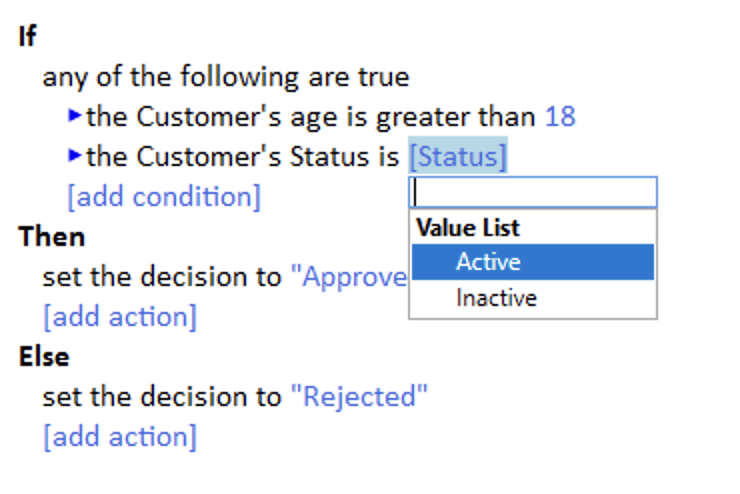
Notice how the second version reads almost like a sentence. Every action checking or setting things like Customer, Age, Status, Decision comes from a predefined vocabulary, eliminating typos and ensuring consistency across rules.
InRule’s guided authoring features also provide:
- Type-ahead and filtering – so authors pick valid data elements instead of typing freeform text.
- Validation during authoring – catching missing values or logical conflicts before rules are deployed.
- Placeholders and templates – enabling reuse of standard logic patterns (for example, “Credit Limit Threshold” rather than hardcoding numbers).
- Decision tables – also leverage readable statements for more complex rule sets.
Illustrating Clarity with Examples
Here are a few small but powerful transformations that demonstrate the difference.
Example 1: Threshold checks
Technical version:
if (OrderAmount > Customer.CreditLimit * 1.1) then Flag = TrueBusiness Language:
Clear, traceable, and easily understood by both analysts and auditors.
Example 2: Tier-based decisions with actions
Instead of a long list of nested conditions, InRule lets you express business logic in readable, tabular form. In addition, the same vocabulary we created for natural language can be used to trigger complex actions such as reaching out to another system for human related tasks.
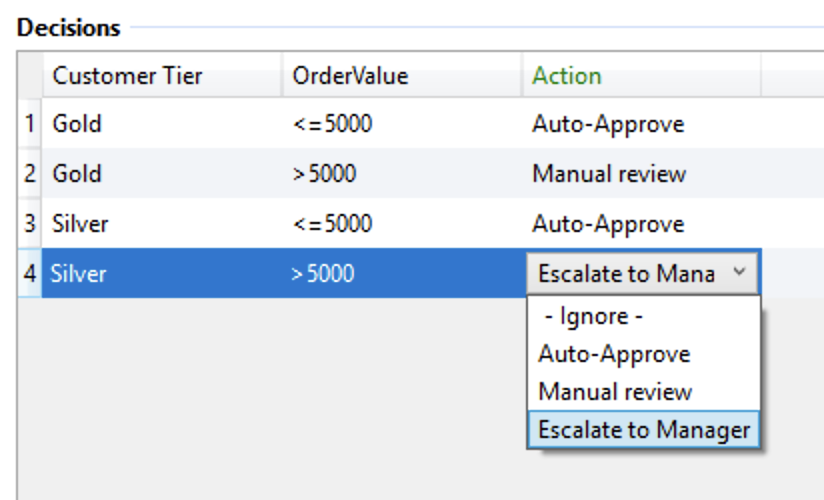
In the above example, phrases like “Auto-approve” continue system processing within InRule, and “Manual Review” and “Escalate to Manager” are configurable templates to perform a number of actions automatically, like calling out to another platform such as InRule’s Process Automation to start a workflow.
Business Rule Authoring Best Practices
Authoring in business language is powerful, but like any skill, it benefits from discipline. These best practices help teams get the most from InRule’s capabilities:
- Use consistent, domain-specific vocabulary – Build and maintain a glossary so “Active,” “Approved,” or “ThresholdAmount” mean exactly the same thing everywhere.
- Keep each rule focused – One clear intention per rule makes testing and review easier.
- Favor positive logic – “If the account is active” is easier to grasp than “If the account is not inactive.”
- Replace constants with parameters – Use shared placeholders by implementing InRule’s Inline Value lists instead of hardcoded numbers or strings.
- Collaborate across teams – Have business and technical users co-review rules regularly; InRule’s authoring environment makes this straightforward.
- Leverage validation and versioning – Regular testing using InRule’s built in testing tools and clear change tracking with InRule’s Catalog ensure rules evolve safely.
These small habits create a culture of clarity—where everyone understands what a rule does and whyit exists.
Real-World Benefits of Business Language Authoring
Organizations using InRule’s business language report:
- Fewer rule defects due to clearer authoring and built-in validation
- Faster change cycles, because subject matter experts can update rules without waiting for IT
- Reduced review time, as auditors and compliance teams can read rules directly
- Higher confidence, since rules reflect shared, unambiguous business intent
For example, one compliance team found that rewriting 40 legacy rules into business language reduced their quarterly review process from two weeks to three days—because reviewers no longer had to translate technical logic back into business terms.
Getting Started
Transitioning to business-language authoring doesn’t require an overhaul. You can start small:
- Identify a high-impact rule set that’s often misinterpreted.
- Rewrite a few rules using InRule’s Business Language Authoring Tutorial as a guide (docs.inrule.com).
- Review the results with your business stakeholders.
- Measure how much faster reviews and updates happen.
As your team grows more comfortable, expand the approach across departments. Over time, you’ll see fewer errors, clearer collaboration, and faster time-to-value.
Rules That Everyone Understands
When business rules speak your organization’s language, everyone wins.
Developers save time translating intent. Reviewers and auditors trust what they read. Business users feel empowered to contribute. And the result is a decision automation environment that’s faster, clearer, and less prone to costly mistakes.
InRule’s Business Language Authoring helps you bridge the gap between technical precision and business clarity – so your rules don’t just run; they communicate.
Don’t just read about rule clarity – experience it.
Explore a sample Rule Application in the InRule Product Tour and see how no-code business language authoring delivers faster updates, improved collaboration, and confident decision automation.